Key takeaways
- UTM parameters are tags added to a link so your analytics knows where each visit came from.
- Always set utm_source, utm_medium and utm_campaign; utm_content and utm_term are optional.
- Values are case sensitive, so pick lowercase and stay with it.
- Untagged WhatsApp and Instagram clicks often land in "direct", so tag every link you share.
- Put the tags on the destination and share a short link, so customers never see them.
On this page
- What are UTM parameters?
- Why WhatsApp and Instagram traffic shows up as “direct”
- The five UTM parameters, with examples
- Is it five or six parameters? What about utm_id?
- utm_source
- utm_medium
- utm_campaign
- utm_content and utm_term
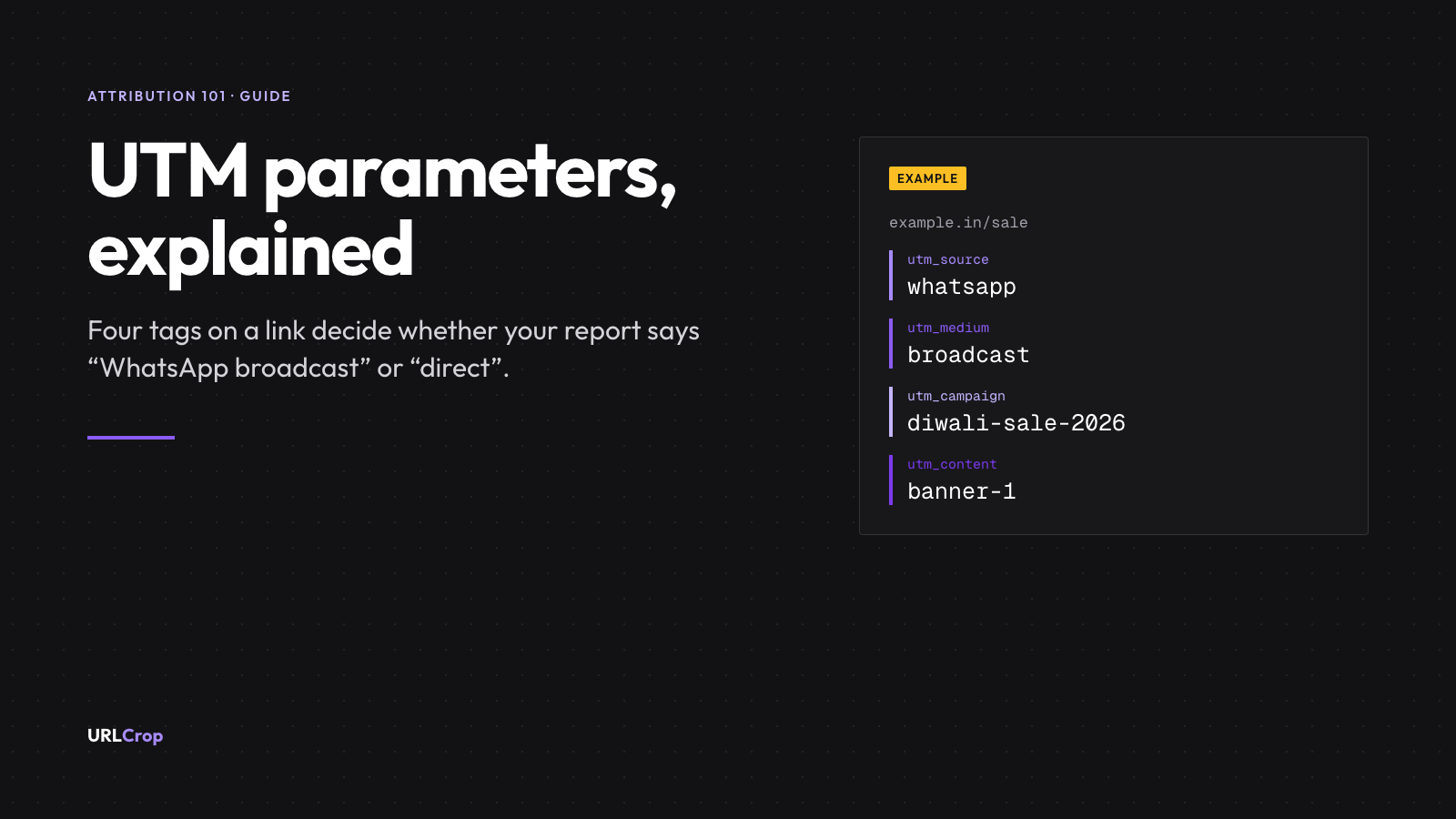
- A full UTM link, taken apart
- How to add UTM parameters to a link
- With a free tool
- By hand
- In a short link
- UTM parameter examples for Indian channels
- A naming convention that keeps reports clean
- What the tags look like in your report
- Audit your existing links in ten minutes
- Where to see UTM data in GA4
- Common UTM mistakes
- Do UTM parameters affect SEO?
- FAQs
Picture a Diwali sale promoted on a WhatsApp broadcast, an Instagram bio link and an SMS reminder. A week later Google Analytics shows most of the visits as “direct”, and nobody can say which message earned them. UTM parameters fix that. They are short tags added to the end of a link, and they tell Google Analytics where each visit came from.
This guide to UTM parameters covers what each tag means, the exact values I would use for Indian channels, and a naming convention you can copy into a shared sheet today. The reason it matters: when “direct / (none)” becomes the biggest row in a campaign report, the cause is nearly always that nobody tagged the links.
What are UTM parameters?
UTM parameters are tags added to a URL after a question mark, such as utm_source=whatsapp. When someone clicks the link, Google Analytics reads the tags and records the source, medium and campaign of that visit, so your report can tell a WhatsApp broadcast from an Instagram bio link.
The full form is Urchin Tracking Module. Wikipedia notes that the parameters were introduced by Urchin, the predecessor of Google Analytics, and that Google acquired Urchin in April 2005. Today the reference everyone paraphrases is Google’s own help page, URL builders: Collect campaign data with custom URLs. I use it throughout this guide.
A UTM tag does not identify a person. It labels a link. Every visitor who clicks the same tagged link carries the same labels.
Why WhatsApp and Instagram traffic shows up as “direct”
When a visit has no campaign tags and no referring website, Google Analytics files it under Direct. Google’s default channel group rules define Direct as a source that exactly matches “(direct)” and a medium of “(not set)” or “(none)”.
A WhatsApp message is not a web page, so a link opened from it may reach your site with no referring website, or with one that says nothing about which message sent it. Google’s page on campaigns and traffic sources says a session is processed as direct traffic “when no information about the referral source is available”. So an untagged link in a WhatsApp broadcast tends to be reported as Direct, mixed in with people who typed your address into a browser. The tags are the only thing that separates them.
The five UTM parameters, with examples
The classic set is five parameters. Three are the ones Google tells you to always use. Google’s wording is: “When you add parameters to a URL, you should always use utm_source, utm_medium, and utm_campaign.” The other two are optional.
| Parameter | Question it answers | Example value | Use it? |
|---|---|---|---|
utm_source | Who sent the visit? | whatsapp, instagram, newsletter | Always |
utm_medium | What kind of channel was it? | social, sms, email | Always |
utm_campaign | Which offer or campaign? | diwali-sale-2026 | Always |
utm_content | Which link or creative in the message? | banner-1, store-mumbai-01 | When you run more than one link |
utm_term | Which keyword? | running-shoes | Mostly paid search |
Is it five or six parameters? What about utm_id?
Sources disagree, so I checked Google’s page. It currently lists nine: utm_id, utm_source, utm_medium, utm_campaign, utm_source_platform, utm_term, utm_content, utm_creative_format and utm_marketing_tactic. The page notes that utm_creative_format and utm_marketing_tactic are not currently reported in Google Analytics properties.
Google also says it strongly recommends setting all relevant parameters, especially source, medium, campaign, utm_id and utm_source_platform. So “five parameters” is the traditional answer and still the core. utm_id is a campaign ID you can add when you want a stable identifier next to the readable campaign name. For a small business, the first three plus content cover nearly every question.
utm_source
The source names where the visit was sent from: a platform, a list or a place. whatsapp, instagram, sms, newsletter. Keep it to one lowercase word.
utm_medium
The medium is the type of channel, and it is the one that needs the most care, because GA4 uses it to decide which default channel a visit belongs to. The default channel group rules include these (they are not case sensitive):
| Default channel | What matches, per Google’s article |
|---|---|
| Source or medium is email, e-mail, e_mail or e mail | |
| SMS | Source or medium exactly matches sms |
| Organic Social | Source is on a list of social sites, or medium is one of social, social-network, social-media, sm, social network, social media |
| Paid Social | Source is a social site and medium matches ^(.*cp.*|ppc|retargeting|paid.*)$ |
| Referral | Medium is one of referral, app or link |
| Affiliates | Medium is affiliate |
The practical lesson: utm_medium=sms and utm_medium=email land in the right channel automatically, and utm_medium=social lands in Organic Social. The source counts too. Google publishes a list of social sources with that article, and I checked it: whatsapp and instagram are both on it. So whatsapp / broadcast still lands in Organic Social, because the source alone matches. A pair I invent on both sides, such as standee / qr, matches no rule, and Google files it as Unassigned. Decide on purpose which you want, and write it down.
utm_campaign
The campaign names the offer or push: diwali-sale-2026, new-store-pune, always-on. Put the season or year in it, so next year’s sale does not merge with this year’s.
utm_content and utm_term
utm_content tells apart two links inside the same campaign, such as banner-1 and text-link, or one QR code per store. utm_term was built for paid-search keywords. Most Indian small-business campaigns never need it.
A full UTM link, taken apart
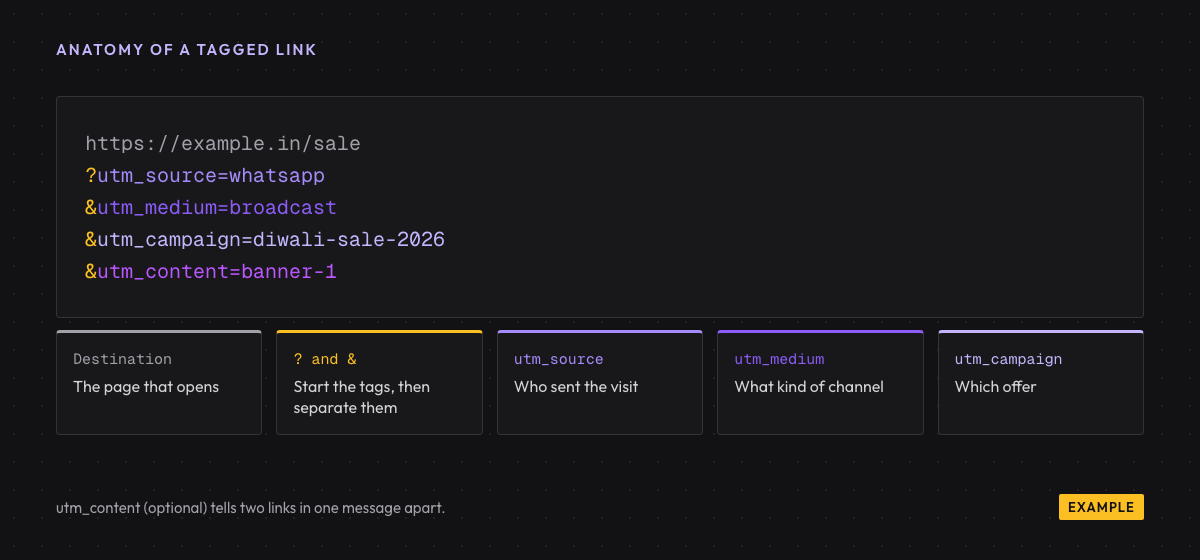
Here is one tagged link, built for a WhatsApp broadcast. The domain is a placeholder:
https://example.in/sale?utm_source=whatsapp&utm_medium=broadcast&utm_campaign=diwali-sale-2026&utm_content=banner-1https://example.in/saleis the page that opens.?starts the tags. It appears once.&separates one tag from the next.- Each tag is a name, an equals sign and a value, with no spaces.
Order does not matter. Google says: “You can add parameters to a URL in any order.” I count 115 characters in this link, which is long for a message a customer reads. We fix that later with a short link.
How to add UTM parameters to a link
With a free tool
The quickest route is a form that assembles the URL for you. Our free UTM builder runs in your browser and stores nothing: you type the destination and the values, and it prints the finished link. Its main use is catching typos, such as a missing & or a stray space.
By hand
Writing the link yourself is fine for a one-off, as long as you remember the encoding trap. A space or an & inside a value breaks the link. A space becomes %20 and an ampersand becomes %26. I encoded the phrase “Diwali Sale & Gifts” with encodeURIComponent and got Diwali%20Sale%20%26%20Gifts. That is unreadable in a report. Use hyphens and avoid special characters, and you never meet the problem.
In a short link
This is the method I recommend for anything a customer will see. Put the UTM tags on the destination, create a short link to that tagged destination, and share the short link. Customers see a 23-character link such as https://crop.sh/Exampl1 instead of a 115-character one, and the tags still reach Analytics when the visit lands.
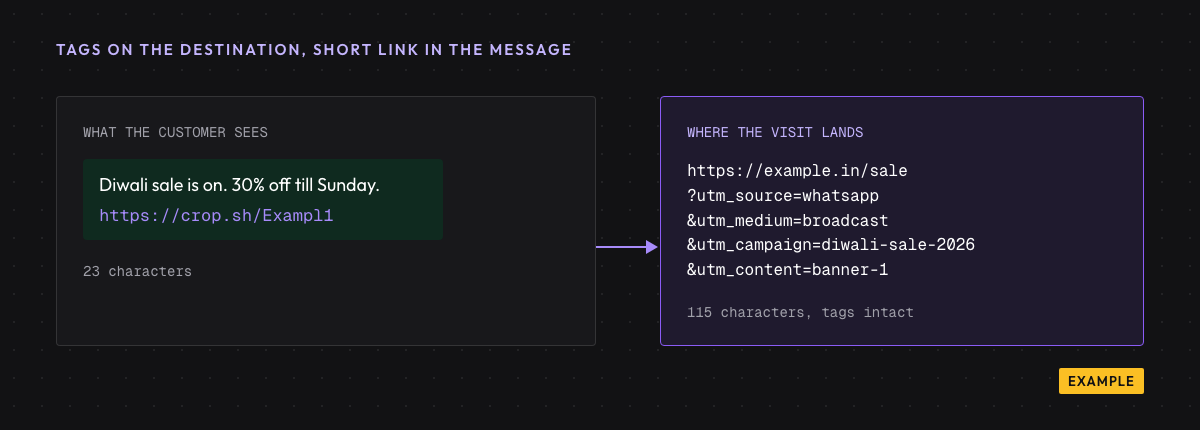
With short links with UTM templates you can save a set of tags once and apply it when you create each link. Saved UTM templates are available from the Starter plan; see pricing for what each plan includes. If you edit the destination later, the short link stays the same, which matters for anything already printed or sent.
UTM parameter examples for Indian channels
These are example links, not live campaigns. Each uses the placeholder destination https://example.in/sale and a Diwali campaign, so you can compare channels side by side. I built each one and counted its length.
| Channel | source | medium | campaign | content | Link length |
|---|---|---|---|---|---|
| WhatsApp broadcast | whatsapp | broadcast | diwali-sale-2026 | banner-1 | 115 |
| WhatsApp status | whatsapp | status | diwali-sale-2026 | story-1 | 111 |
| Instagram bio | instagram | social | always-on | link-in-bio | 109 |
| SMS (DLT-registered) | sms | sms | diwali-sale-2026 | reminder-d3 | 107 |
| Printed QR standee | standee | qr | diwali-sale-2026 | store-mumbai-01 | 114 |
| Influencer post | instagram | influencer | diwali-sale-2026 | creator-reel | 121 |
| Email newsletter | newsletter | email | diwali-sale-2026 | header-cta | 115 |
A few notes on these choices.
- Instagram bio.
instagramis on Google’s social list, so the visit lands in Organic Social;socialas the medium keeps the report readable. The bio link is one fixed place, so usealways-onas the campaign and change it only when the bio link changes. - SMS.
smsas the medium lands in the SMS channel. Check your SMS provider’s DLT rules before you send a short link. - Printed QR. Each store gets its own
utm_content. If you also want scan counts by day and city, put the tagged URL behind a dynamic code. Our guides on static vs dynamic QR codes and how to track QR code scans in GA4 cover that. - Influencer posts. Give each creator a different
utm_content. Never put anything personal in it. A creator handle is fine. A phone number is not. We will cover how to track influencer sales in India in a separate guide. - WhatsApp. If you are building the destination link itself, the WhatsApp link generator makes a click-to-chat link.
A naming convention that keeps reports clean
Google’s help page says it plainly: “Parameter values are case sensitive, e.g. utm_source=google is different from utm_source=Google.” So WhatsApp, Whatsapp and whatsapp show up as three rows. That one sentence is the reason to have a convention.
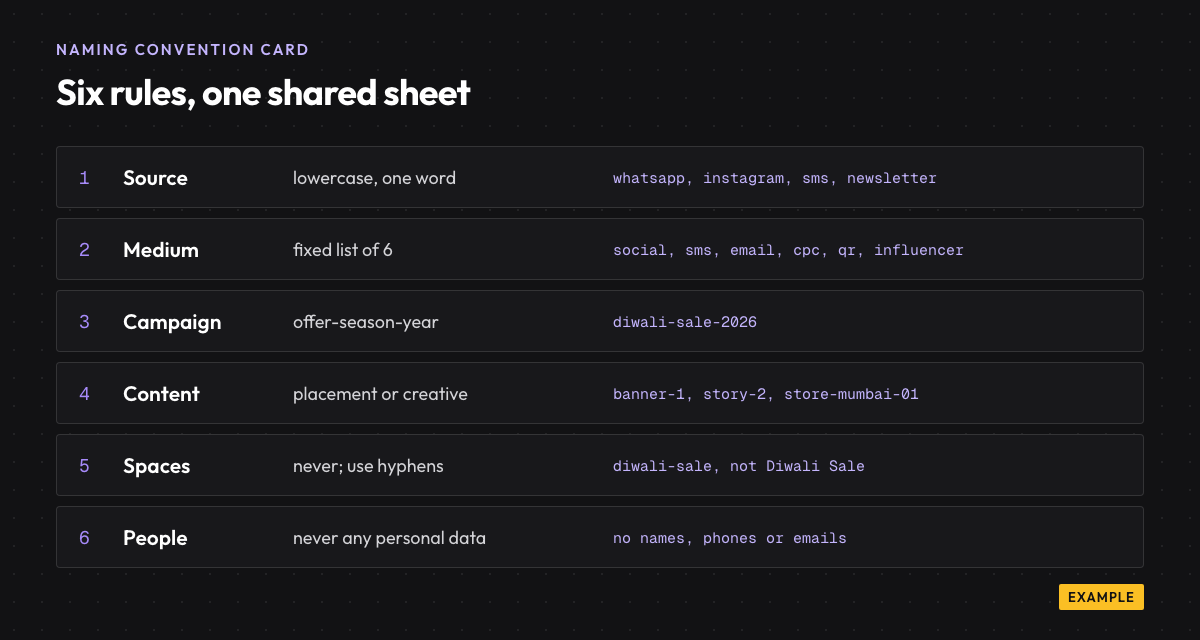
| Field | Rule | Allowed values (example) |
|---|---|---|
| utm_source | Lowercase, one word, the platform or list | whatsapp, instagram, sms, newsletter, standee |
| utm_medium | Pick from a fixed list; add to it only by agreement | social, sms, email, cpc, qr, influencer |
| utm_campaign | offer, then season, then year, with hyphens | diwali-sale-2026, new-store-pune-2027 |
| utm_content | Placement or creative; number repeats | banner-1, story-2, store-mumbai-01 |
| Spaces and symbols | Never. Use hyphens | diwali-sale, not Diwali Sale |
| Personal data | Never | No names, phone numbers or emails |
My opinion, after seeing this go wrong: one shared sheet beats any tool. A tool can only enforce rules somebody wrote down. Keep one sheet with a row per link (date, owner, channel, full link, short link), and give one person ownership of it. Anyone who needs a new medium asks that person first. That habit is more valuable than any feature, and it costs nothing.
What the tags look like in your report
Tags only help if you can read them back. Take the Diwali campaign above and send it through four channels. Each link carries its own tags, so the Session source / medium column in GA4 can show these rows (this is what the values above would produce, not a measured result):
| Where the link was shared | Session source / medium | Session campaign | Default channel (per Google’s rules) |
|---|---|---|---|
| WhatsApp broadcast | whatsapp / broadcast | diwali-sale-2026 | Organic Social (whatsapp is on Google’s social list) |
| Instagram bio | instagram / social | always-on | Organic Social |
| SMS reminder | sms / sms | diwali-sale-2026 | SMS |
| Newsletter | newsletter / email | diwali-sale-2026 |
Compare that with the untagged version of the same four sends. The WhatsApp and SMS visits would have no campaign and, in many cases, no referring website, so they fall into the Direct row. Nothing in the report would say which message earned the sale.
Because whatsapp is on Google’s social list, WhatsApp visits sit in Organic Social alongside Instagram, whatever medium you choose. If WhatsApp is a major channel for you, build a custom channel group in GA4 that gives it its own row. I prefer that, because broadcasts are a different job from social posts. For a small business, reading the Session source / medium rows is simpler and good enough.
Audit your existing links in ten minutes
You do not have to start from zero. Open the last three campaigns you ran and list every link you shared. For each one, ask three questions: did it carry source, medium and campaign; did it use your agreed lowercase values; and does the sheet record who sent it and when? Fix the next send, not the past one. Historic data cannot be re-tagged. What you can do is stop the mess from growing, and a week after the new convention starts the report is already easier to read.
Where to see UTM data in GA4
In Google Analytics 4, open Reports, then Acquisition, then Traffic acquisition. Change the primary dimension to Session source / medium to see rows like whatsapp / broadcast. To see campaign names, switch to a campaign dimension such as Session campaign.
If a row reads “(not set)”, a parameter was missing. Google’s page says: “Missing UTM parameters will result in (not set) values being present in reporting.” Also note that UTM information is not captured in the “Landing page + query string” dimension. Google says it is instead populated in the Page location dimension.
Tags tell you who clicked and what they did on your site. For a count of the clicks themselves, before the visit loads, see clicks and campaigns in one report from the short link side. The two views should roughly agree, and where they differ is worth a look.
Common UTM mistakes
- Mixed case.
Instagramandinstagramare different values. Always lowercase. - Tagging your own links. Google’s campaigns and traffic sources page says a new campaign seen in the middle of a session does not start a new session; the new values are tied to the events where they were collected. So a tag on a link between your own pages keeps the session’s source but stamps a made-up campaign on the events that follow. Use tags only on links that bring people in.
- Personal data in values. A tag is visible in the address bar, in logs and in shared screenshots. Never include a name, phone number or email.
- Tagging one link two ways. If the broadcast uses
whatsappand a reminder useswa, you split one channel into two rows. - Swapping source and medium.
utm_medium=whatsapp&utm_source=broadcastreads backwards in every report. Source is who, medium is how. - Forgetting the campaign. Missing tags come back as “(not set)”.
Before sending anything, click your own tagged link once and check it in a test property or the real-time report. A typo caught before the send costs nothing; one caught after costs a week of messy data.
Do UTM parameters affect SEO?
The Google pages I opened do not describe UTM parameters as a ranking factor. The practical worry is duplicate URLs: the same page reachable at several addresses because of tags. Google’s page on consolidating duplicate URLs uses a URL with a click-tracking parameter (gclid) as its example, and says canonicalisation helps search engines consolidate the signals they have for the individual URLs. In practice, set a canonical tag on the clean page and keep tagged links for campaigns, not for navigation.
FAQs
What is the full form of UTM?
UTM stands for Urchin Tracking Module. Urchin was the analytics software that Google acquired in April 2005 and that became Google Analytics.
Which UTM parameters are required?
Google says you should always use utm_source, utm_medium and utm_campaign. It also strongly recommends setting every relevant parameter, especially utm_id and utm_source_platform. utm_term and utm_content are optional.
Are UTM parameters case-sensitive?
Yes. Google’s help page says utm_source=google is different from utm_source=Google. Pick lowercase and stay with it.
Do UTM parameters work with WhatsApp?
Yes. Add them to the destination link, then share it in your message. The tags travel with the visit. Sharing a short link to the tagged destination keeps the message tidy. A dedicated guide on UTM parameters for WhatsApp campaigns will follow.
Can UTM parameters identify a person?
No. They label a link, not a visitor, and they must never carry personal data such as names, phone numbers or emails.
Can I use UTM parameters on a QR code?
Yes. Add the tags to the destination URL before you create the code. A dynamic code keeps the printed pattern small and lets you change the destination later; see static vs dynamic QR codes.
Is there a version for agencies running many clients?
The same convention works across clients if each one gets its own campaign prefix. Our agencies page covers working across many clients.
Revenue attribution
See which link made the sale
URLCrop ties each order back to the link or QR code that brought the buyer, in rupees. Start with tracked links on Free; revenue attribution comes with paid plans.
Free plan, no card needed.

Newsletter
The URLCrop newsletter
Get one link, QR and attribution playbook a week. No spam, unsubscribe any time.